

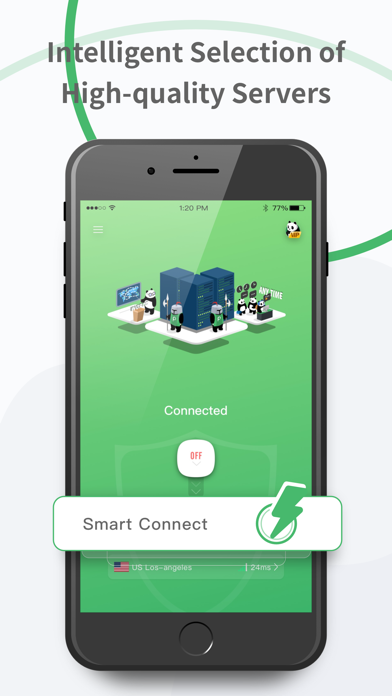


PandaVPN Pro – Fast & Secure VPN for Private Browsing, Streaming & Gaming
Secure & Private Online Access with a Fast & Reliable VPN
Protect your privacy, enhance online security, and browse with confidence using PandaVPN Pro – the best secure VPN app for iPhone and iPad users seeking a fast VPN for streaming, gaming, and private browsing. Whether on public Wi-Fi or needing a private VPN connection for remote work, our high-speed, no-log service delivers seamless protection. Download now for instant secure VPN for iPhone!
◆ Why Choose PandaVPN Pro?
√ Fast & Stable Connection – WireGuard/OpenVPN for top speed and encryption in secure VPN for iPhone.
√ Seamless Streaming & Gaming – Unlock Netflix/Hulu with fast VPN for streaming; buffer-free play.
√ Optimized for Gamers – Low lag for PUBG/Fortnite via fast VPN for gaming.
√ Privacy-Focused – No logs for private VPN for iPhone anonymity.
√ Secure Public Wi-Fi – Encryption for secure VPN for public WiFi.
√ Smart Split Tunneling: Customise routing by Region, Social Media, or custom IP/Domain rules for precise control.
√ User-Friendly – One-tap to servers for private browsing with VPN.
√ 3-Day Free Trial – Test best VPN for privacy risk-free.
√ Multiple Device Support – Secure VPN connection across iOS.
Trusted by 500K+ users across global markets, PandaVPN Pro earns praise from TechRadar for reliable encryption – your shield for private internet VPN.
Experience Safe & Fast Online Browsing – Download PandaVPN Pro Today!
◆ Stay Connected with Your Favorite Apps
▸ Secure Telegram/WhatsApp/Instagram with private VPN for public networks.
▸ Encrypted calls via secure VPN for iOS and fast VPN for video calls.
◆ Smooth Streaming – Anytime, Anywhere
▸ High-speed for fast VPN for Netflix/Hulu global access.
▸ Dodge throttling with VPN for secure streaming.
▸ Abroad routine intact via best VPN for secure streaming and best VPN for online banking.
◆ Optimized for Gaming – Low Latency, High Performance
• Stable play in PUBG/Free Fire/Roblox with secure VPN for gaming.
• Regional servers for VPN for secure remote access.
• No threats; fast private VPN connection.
• Ideal for secure VPN for fast connection.
◆ Who Benefits from PandaVPN Pro?
√ Students – Sites unlocked via secure VPN for college WiFi.
√ Gamers – Global access with best fast VPN for iPhone.
√ Remote Workers – Data safe in calls via private VPN for work security and best VPN for remote work.
√ Streaming Fans – No cuts with fast VPN for video calls and secure file share.
√ Privacy Users – Free browsing via best VPN for mobile privacy and secure browsing VPN.
√ Travelers – Home links via secure VPN for travel and secure VPN for iPad.
Download PandaVPN Pro Now – Start Secure Browsing!
◆ Global VPN Server Network
◆ Global VPN Server Network
■ Tap into blazing-fast servers worldwide, including:
■ United States VPN – For lightning-quick US access.
■ United Kingdom VPN – Seamless UK streaming and browsing.
■ Canada VPN – Reliable North American connections.
■ Japan VPN – Low-latency for Asian gaming hubs.
■ Germany VPN – Strong European privacy shields.
■ Australia VPN – Down-under speed without slowdowns.
■ Singapore VPN – Asia-Pacific powerhouse.
■ India VPN – Vast regional coverage.
■ Malaysia VPN – Southeast Asia optimized.
■ Indonesia VPN – Local and global reach.
■ South Korea VPN – K-content and gaming paradise.
■ United Arab Emirates VPN – Middle East secure gateway.
■ Argentina VPN – South American streaming boost.
■ France VPN – Euro favorites unlocked.
■ Hong Kong VPN – Asia's connectivity nexus...
Not available in mainland China.
Get PandaVPN Pro for safer, faster privacy – best VPN app for iPhone security!
◆ Subscription & Terms
Auto-Renewal: [https://pandavpnpro.com/auto-renewal-agreement]
Privacy Policy: [https://pandavpnpro.com/privacy-policy]
Terms: [https://pandavpnpro.com/terms-of-service]
Contact: panda7x24@gmail.com
Secure & Private Online Access with a Fast & Reliable VPN
Protect your privacy, enhance online security, and browse with confidence using PandaVPN Pro – the best secure VPN app for iPhone and iPad users seeking a fast VPN for streaming, gaming, and private browsing. Whether on public Wi-Fi or needing a private VPN connection for remote work, our high-speed, no-log service delivers seamless protection. Download now for instant secure VPN for iPhone!
◆ Why Choose PandaVPN Pro?
√ Fast & Stable Connection – WireGuard/OpenVPN for top speed and encryption in secure VPN for iPhone.
√ Seamless Streaming & Gaming – Unlock Netflix/Hulu with fast VPN for streaming; buffer-free play.
√ Optimized for Gamers – Low lag for PUBG/Fortnite via fast VPN for gaming.
√ Privacy-Focused – No logs for private VPN for iPhone anonymity.
√ Secure Public Wi-Fi – Encryption for secure VPN for public WiFi.
√ Smart Split Tunneling: Customise routing by Region, Social Media, or custom IP/Domain rules for precise control.
√ User-Friendly – One-tap to servers for private browsing with VPN.
√ 3-Day Free Trial – Test best VPN for privacy risk-free.
√ Multiple Device Support – Secure VPN connection across iOS.
Trusted by 500K+ users across global markets, PandaVPN Pro earns praise from TechRadar for reliable encryption – your shield for private internet VPN.
Experience Safe & Fast Online Browsing – Download PandaVPN Pro Today!
◆ Stay Connected with Your Favorite Apps
▸ Secure Telegram/WhatsApp/Instagram with private VPN for public networks.
▸ Encrypted calls via secure VPN for iOS and fast VPN for video calls.
◆ Smooth Streaming – Anytime, Anywhere
▸ High-speed for fast VPN for Netflix/Hulu global access.
▸ Dodge throttling with VPN for secure streaming.
▸ Abroad routine intact via best VPN for secure streaming and best VPN for online banking.
◆ Optimized for Gaming – Low Latency, High Performance
• Stable play in PUBG/Free Fire/Roblox with secure VPN for gaming.
• Regional servers for VPN for secure remote access.
• No threats; fast private VPN connection.
• Ideal for secure VPN for fast connection.
◆ Who Benefits from PandaVPN Pro?
√ Students – Sites unlocked via secure VPN for college WiFi.
√ Gamers – Global access with best fast VPN for iPhone.
√ Remote Workers – Data safe in calls via private VPN for work security and best VPN for remote work.
√ Streaming Fans – No cuts with fast VPN for video calls and secure file share.
√ Privacy Users – Free browsing via best VPN for mobile privacy and secure browsing VPN.
√ Travelers – Home links via secure VPN for travel and secure VPN for iPad.
Download PandaVPN Pro Now – Start Secure Browsing!
◆ Global VPN Server Network
◆ Global VPN Server Network
■ Tap into blazing-fast servers worldwide, including:
■ United States VPN – For lightning-quick US access.
■ United Kingdom VPN – Seamless UK streaming and browsing.
■ Canada VPN – Reliable North American connections.
■ Japan VPN – Low-latency for Asian gaming hubs.
■ Germany VPN – Strong European privacy shields.
■ Australia VPN – Down-under speed without slowdowns.
■ Singapore VPN – Asia-Pacific powerhouse.
■ India VPN – Vast regional coverage.
■ Malaysia VPN – Southeast Asia optimized.
■ Indonesia VPN – Local and global reach.
■ South Korea VPN – K-content and gaming paradise.
■ United Arab Emirates VPN – Middle East secure gateway.
■ Argentina VPN – South American streaming boost.
■ France VPN – Euro favorites unlocked.
■ Hong Kong VPN – Asia's connectivity nexus...
Not available in mainland China.
Get PandaVPN Pro for safer, faster privacy – best VPN app for iPhone security!
◆ Subscription & Terms
Auto-Renewal: [https://pandavpnpro.com/auto-renewal-agreement]
Privacy Policy: [https://pandavpnpro.com/privacy-policy]
Terms: [https://pandavpnpro.com/terms-of-service]
Contact: panda7x24@gmail.com